Your first league starts here
How to Compete on Fantasy Wrestling Champ
Pick your wrestlers. Follow the matches. Compete with friends. Fantasy college wrestling turns the results on the mat into points for your league.
This guide walks you through Fantasy Wrestling Champ, from your first invitation to the final standings. You can draft a tournament team, predict champions, or make weekly dual-meet picks.
One sport. A few ways to compete.
1. Choose your way to play.
Start with the experience your group wants. In this app, a “coach” is a fantasy participant—you do not need to coach a real wrestling team.
Draft a tournament team
Fantasy Tournament League: select one wrestler at each weight in a live draft. Your team earns points from tournament wins, bonus results, and placements.
Good for friends who want draft night and a team to follow through the brackets.
Explore tournament leagues →Predict the champions
Championship Pick’Em: choose ten champions before the tournament and rank your confidence from 10 points down to 1. Everyone makes their own selections.
Good for a tournament contest without scheduling a live draft.
Explore Championship Pick’Em →Make picks all season
Weekly Dual Pick’Em: pick the winning wrestler at each weight in your league’s selected duals. Commissioners can also build Custom Weekly Pick’Em contests.
Good for a weekly competition that follows the college dual-meet season.
Explore Weekly Pick’Em →Just want to follow brackets and results? Tournament Tracker is also available, without a fantasy draft or Pick’Em entry.
Get your group together
2. Create or join a league.
Create your account.
Register with email and password, then follow the verification email. If you received an invitation, use the email address that was invited.
Choose your league.
Accept your invitation from My Leagues. Starting your own? Choose a league type, enter a league name, select the season, and choose an available tournament when that format requires one.
Start with League Setup.
Your league opens with directions for your format and role. Follow Your Next Steps, then use Need a Hand? for guides, Q&A, checklists, and videos.
Follow your team through the brackets
3. Draft a team. Earn tournament points.
In a Fantasy Tournament League, each coach drafts one wrestler at each college weight: 125, 133, 141, 149, 157, 165, 174, 184, 197, and heavyweight (HWT).
The commissioner prepares the brackets and draft order, and sends the draft day and time from SETTINGS → League Member Controls. When draft night arrives, open DRAFT and make your selection when it is your turn. A wrestler already drafted by another coach is unavailable.
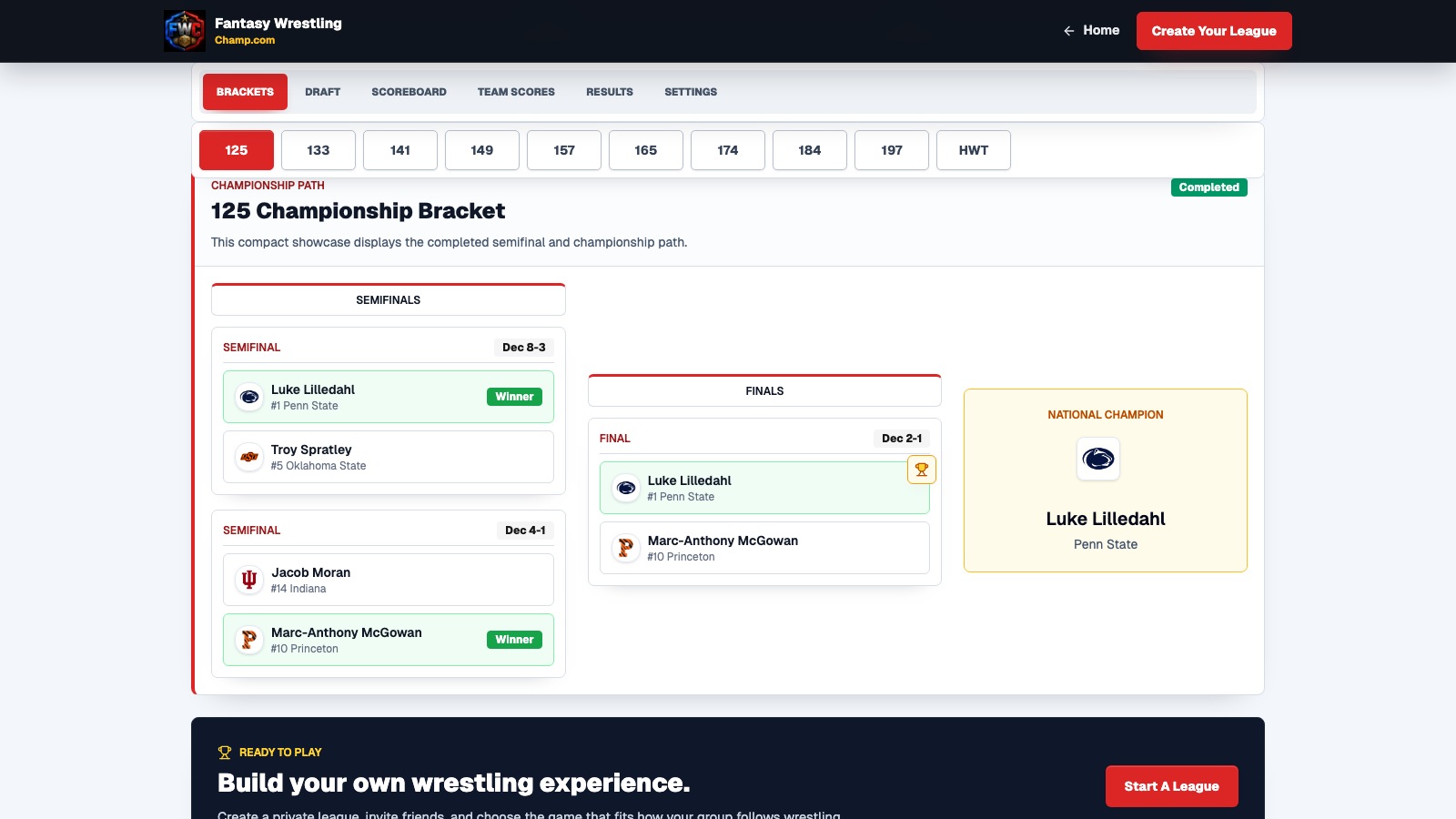
After the draft, follow matches in BRACKETS, individual performances in RESULTS, and your fantasy team in SCOREBOARD. TEAM SCORES tracks the schools’ tournament totals separately.
How tournament scoring works
Under the app’s standard rules, a championship-path win before the final earns 1 advancement point; a consolation advancement win earns 0.5. Add bonus points for a major decision (+1), technical fall (+1.5), or fall, forfeit, injury/default, or disqualification (+2).
Final placement matches do not add advancement points. They can still add bonus points. Placement points depend on whether the tournament places through four, six, or eight wrestlers. Review your league’s rules and guide for its format.
A bye does not score on its own. Advancement credit can follow a subsequent real win under the tournament’s rules.
Worked scoring example
One wrestler’s championship run
Fictional 32-person bracket, no byes, standard scoring, with placement through eighth.
| Round / result | Points |
|---|---|
| Round of 32 · Decision | 1 |
| Round of 16 · Major decision | 2 |
| Quarterfinal · Technical fall | 2.5 |
| Semifinal · Decision | 1 |
| Final · Fall | 2 |
| First-place points | 16 |
| Wrestler’s total | 24.5 |
The final’s fall earns 2 bonus points; first place adds 16 placement points. Add your ten wrestlers’ totals to get your fantasy team score.
Explore the tournament’s draft, brackets, and scoreboard in the interactive preview →
Ten champions. Ten confidence values.
4. Make championship confidence picks.
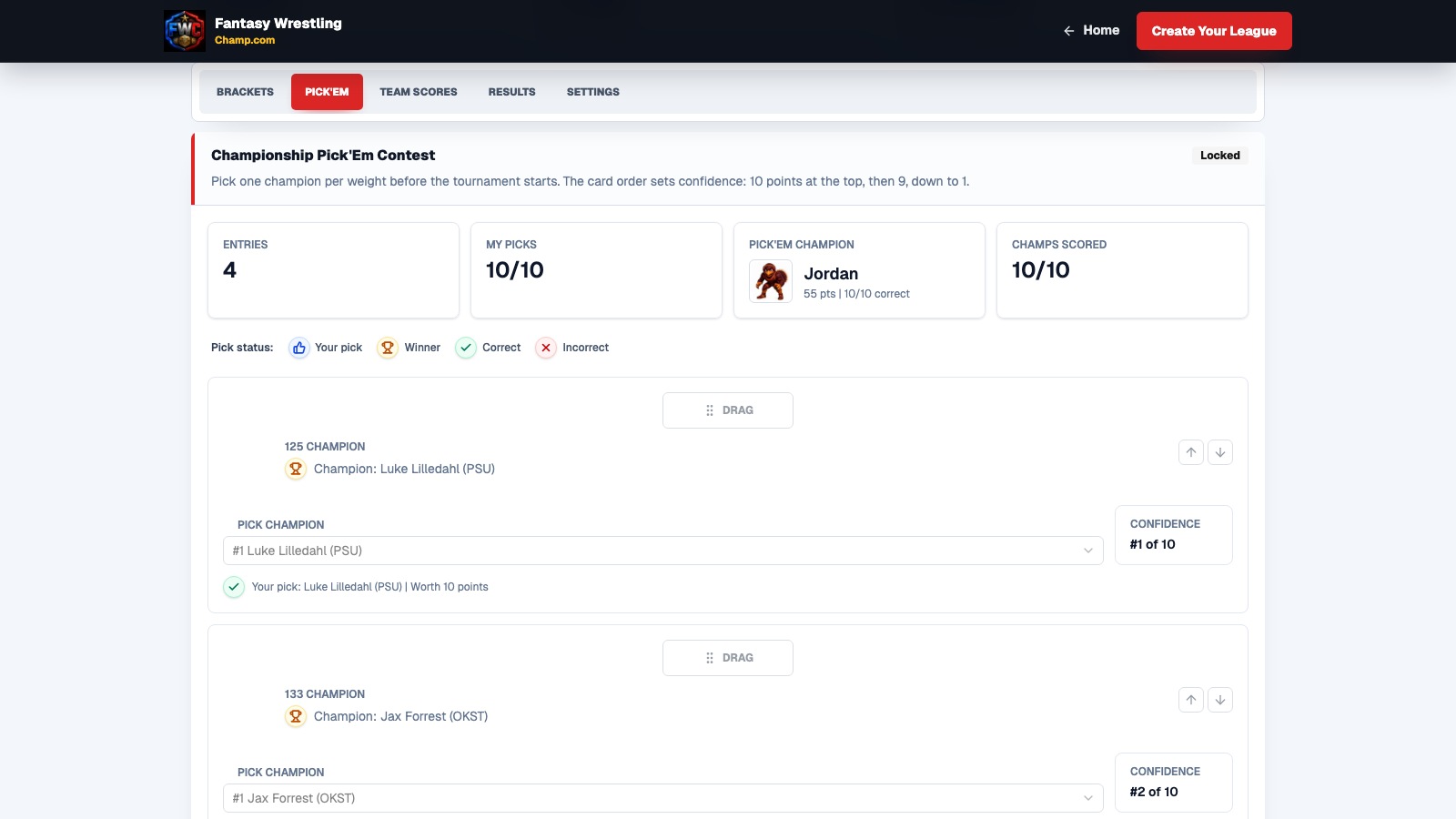
In a standalone Championship Pick’Em Contest, open PICK’EM, choose one champion at every weight, then arrange all ten cards. Put your most confident choice at the top for 10 points, followed by 9, 8, and so on down to 1. Each confidence value is used once.
Submit before the contest’s displayed lock time. Other participants can choose the same wrestlers; the confidence order helps distinguish your entry. A correct champion earns that card’s confidence points. An incorrect champion earns zero.
Worked scoring example
Three picks, 17 points
| Your pick | Points earned |
|---|---|
| 10-point choice wins | 10 |
| 9-point choice loses | 0 |
| 7-point choice wins | 7 |
| These three picks contribute | 17 |
Your remaining seven picks can add more. All ten correct champions earn 55 points.
Championship and Finals Pick’Em are different.
Championship Pick’Em is a standalone contest entered before the tournament, with confidence scoring. Finals Pick’Em is an optional competition inside a draft league after the finalists are known, with one point per correct champion.
Eligible standalone NCAA Championship contests may offer a national entry. You must deliberately copy your submitted picks into that contest; it is not automatic. The national copy cannot be edited, and admission closes when the first NCAA Championship result is entered or synced into the app.
Explore confidence picks and standings in the interactive preview →
A reason to follow every weight
5. Make weekly dual-meet picks.
The commissioner uses SETTINGS → Weekly Dual Meet Selection to enable published duals. Open WEEKLY PICK’EM, choose the week and dual, then pick the winning wrestler at each weight. If your league plays multiple duals that week, submit a separate entry for each one.
Check the displayed picks-open and picks-lock times. Weekly contests normally open Monday at 8:00 AM Eastern; follow the saved times for your contest. Eligible coaches receive an opening email and, if still missing picks, a reminder about 24 hours before lock when the pick window allows it.
If you expect a lineup change, Adjust My Lineup lets you move or remove candidates in your own lineup view before submitting. Confirm your selections and look for the submitted status before leaving the page.
Worked scoring example
Seven correct winners = seven points.
For a completed ten-match dual, seven correct picks and three incorrect picks earn 7 points. Each correct winner is worth 1, including a winner by fall. There are no confidence or bonus points in Weekly Pick’Em.
A wrong pick, a pick assigned to the wrong weight, or a selected wrestler who does not compete earns zero.
Another published dual with six correct picks gives you 7 + 6 = 13 season points from those two duals.
What is Custom Weekly Pick’Em?
Your commissioner can build a ten-match contest with one matchup per weight from up to ten published duals in the same week and season. You make ten picks in that custom contest.
All ten custom picks lock together when the earliest selected dual starts, including matchups from later duals. A later reschedule does not reopen picks.
Custom uses the same one-point-per-correct-winner scoring, with separate custom standings. Eight correct custom picks earn eight custom points; they do not add to the 13 published-dual points in the example.
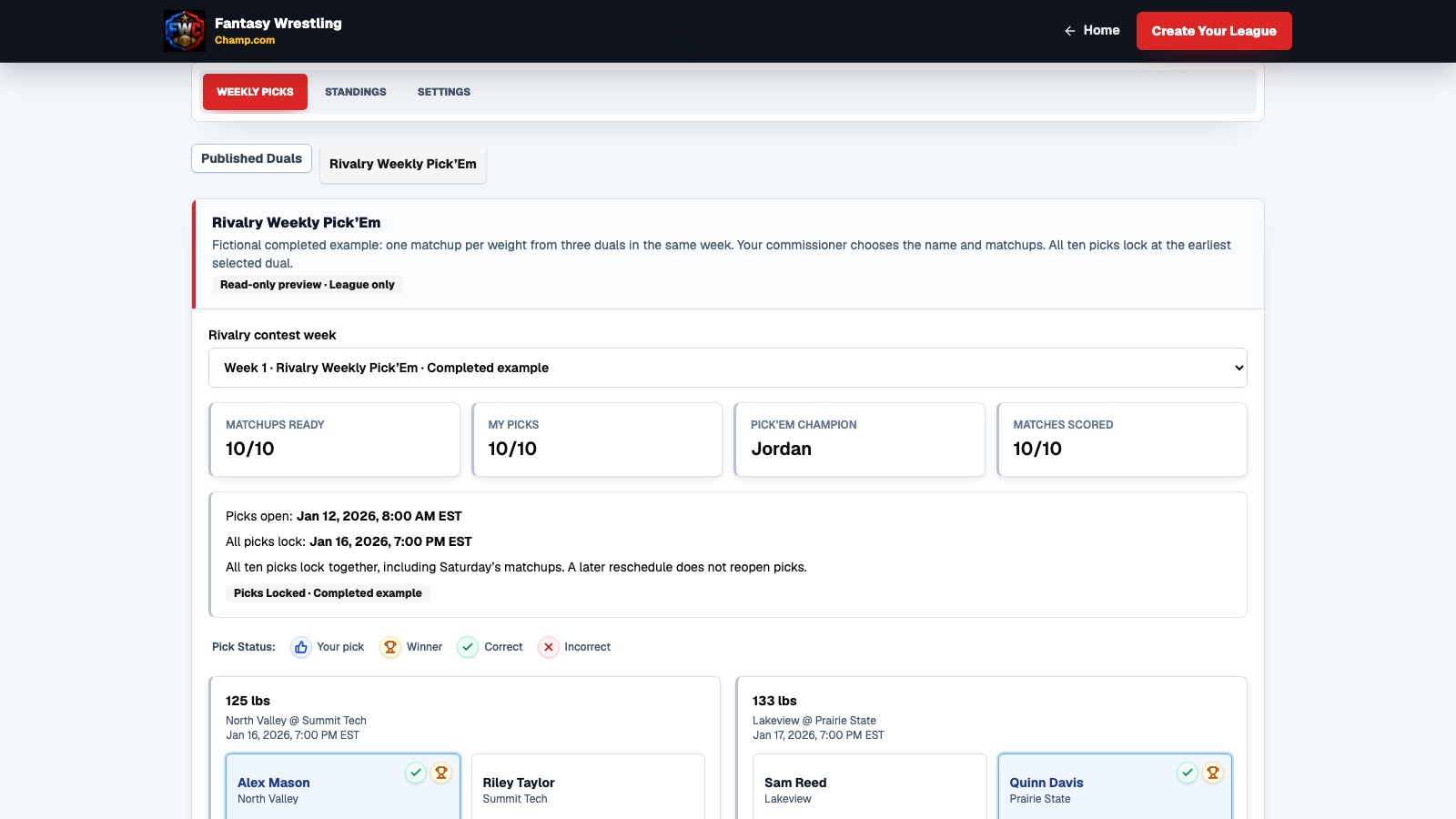
After picks are revealed, use the league’s picks and standings views to compare participant cards. Published duals have weekly and cumulative season standings; custom contests have their own totals. Where offered, a published National Dual of the Week allows a separate, deliberate national submission. Custom contests remain league-only.
Explore published and custom picks in the interactive preview →
Ready for the opening whistle
6. Your first-week checklist.
If you’re the commissioner
- Choose the correct game type, season, and available event.
- Add coaches and send invitations from SETTINGS → League Member Controls.
- For a draft league, prepare brackets and draft order, then send the draft date and time.
- For Weekly, enable your published duals or publish a complete custom contest and review its deadlines.
- Choose manual or supported automatic results in SETTINGS → Results Update Mode for bracket leagues.
- Point participants to League Setup → Need a Hand? when they need help.
If you’re playing
- Use the invited email address and accept your invitation.
- Set your display name and avatar in your profile.
- Read the directions for your league’s format.
- Join the draft when scheduled, or submit every required pick before lock.
- Check for separate entries when your week includes multiple duals.
- Follow results and standings, then come back for the next contest.
Common first-league questions
Do I have to know every college wrestler?
No. Start with a familiar team or event and use the available brackets and matchups to make your selections. You can explore the three interactive previews before creating an account. Pick’Em formats also let you compete without a live draft.
Do all fantasy wrestling sites score the same way?
No. This guide describes Fantasy Wrestling Champ. Tournament team scoring, championship confidence points, and weekly one-point picks are different systems, so review the rules for the league you join.
Why can’t I draft yet?
Your commissioner needs available brackets and a prepared draft. You can join the league and review League Setup while waiting. Check DRAFT and ask your commissioner about the announced draft day and time.
Does joining a league enter me in national standings?
No. National entries are separate submissions offered only for eligible contests. Review the national option and submit deliberately if you want to participate. Custom Weekly Pick’Em remains league-only.
Can I see how the app works without registering?
Yes. Try the tournament preview, championship preview, or weekly preview. They are read-only examples. Screenshots and scoring scenarios in this guide illustrate the game and do not report live competition results.
Where can I find events and more help?
Browse This Season’s Events for the published public schedule. Inside your league, open League Setup → Need a Hand? for role-specific guides, Q&A, checklists, and videos. You can also contact support.
You know the basics. Bring your friends.
Choose your format, create a league or accept an invitation, and give every match a little more meaning.